Reading the receipt: verification, rollback and the audit trail
The half of the workflow that happens after the write. What the Observed column is telling you, what a skipped row means, when to force a rollback (almost never), and which export answers which question.
Most of a bulk editor's value shows up in the ten minutes after a job runs, and on the day six weeks later when somebody asks what changed. This guide covers both.
The Observed column
When a job finishes writing, Gridproof goes back to your live catalog and re-reads every entity it touched, then compares what's actually stored against what the job intended. The result is the Observed column, sitting next to After.
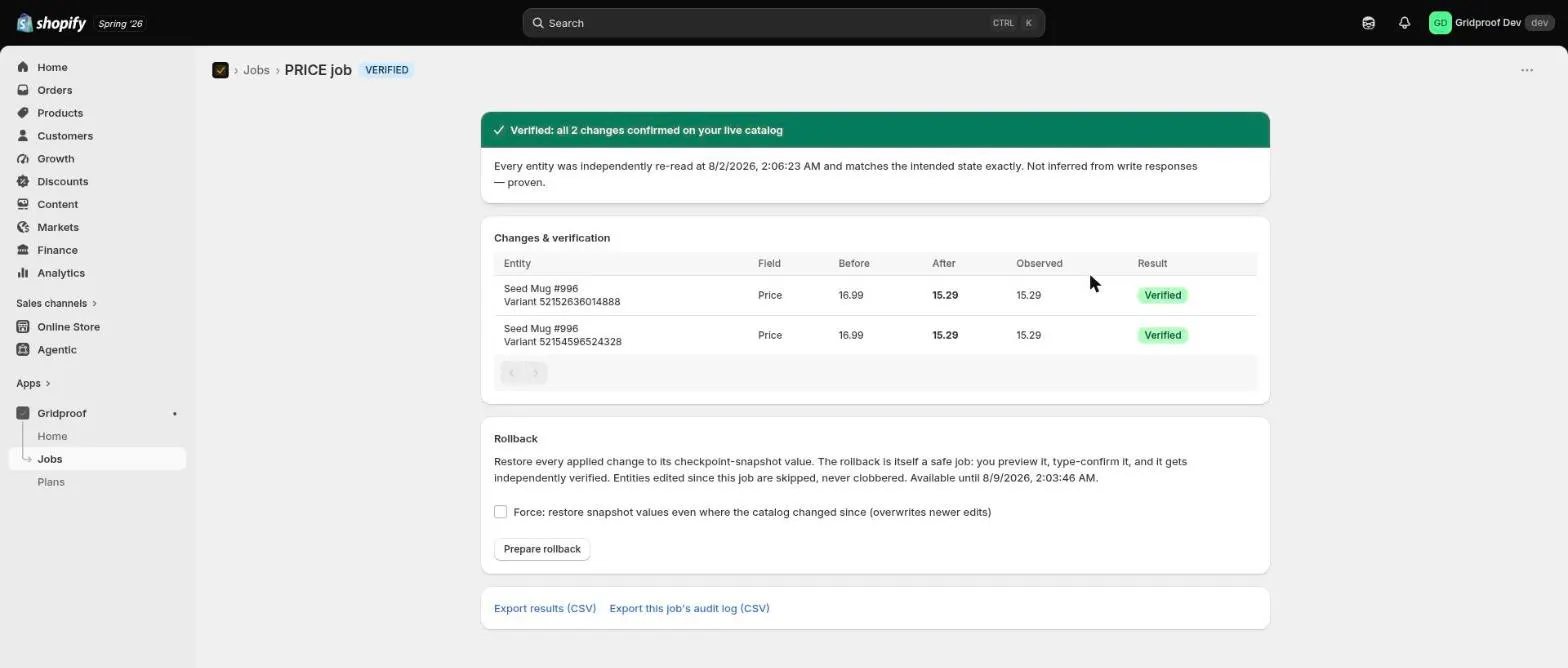
That distinction is the entire point. Reading a write response tells you what was sent; a bulk operation can report itself finished while individual rows inside it failed. Reading the catalog back tells you what is true. The mechanism behind that gap is worth understanding on its own — why "COMPLETED" bulk operations still fail.
A job ends in one of two places:
- Verified — every change was found on the live catalog exactly as intended, with the time of the re-read stated.
- Verification found problems — the count of what landed, the count of what didn't, and for each failure the intended value beside the value your catalog actually holds. Nothing is folded into a success total.
What each row badge means
| Badge | Meaning |
|---|---|
| Verified | Written, and confirmed present on your live catalog. |
| Applied | Written; verification hasn't reached this row yet. |
| Failed | Didn't land, with the reason. The Observed cell shows what's there instead. |
| Skipped — changed since | Rollback only. This entity was edited after the original job, so it was left alone. |
| Rolled back | This change was subsequently restored to its checkpoint value. |
Rolling a job back
Every job stores a checkpoint snapshot taken before anything was written. Rollback restores the fields that job changed to their snapshot values — not the whole product, so edits to other fields by other people and other apps are untouched.
A rollback is itself a full job. You preview it, you type the count to arm it, it executes, and it gets independently verified in exactly the same way. It is not a button that fires immediately, because a recovery run in a panic is how one incident becomes two.
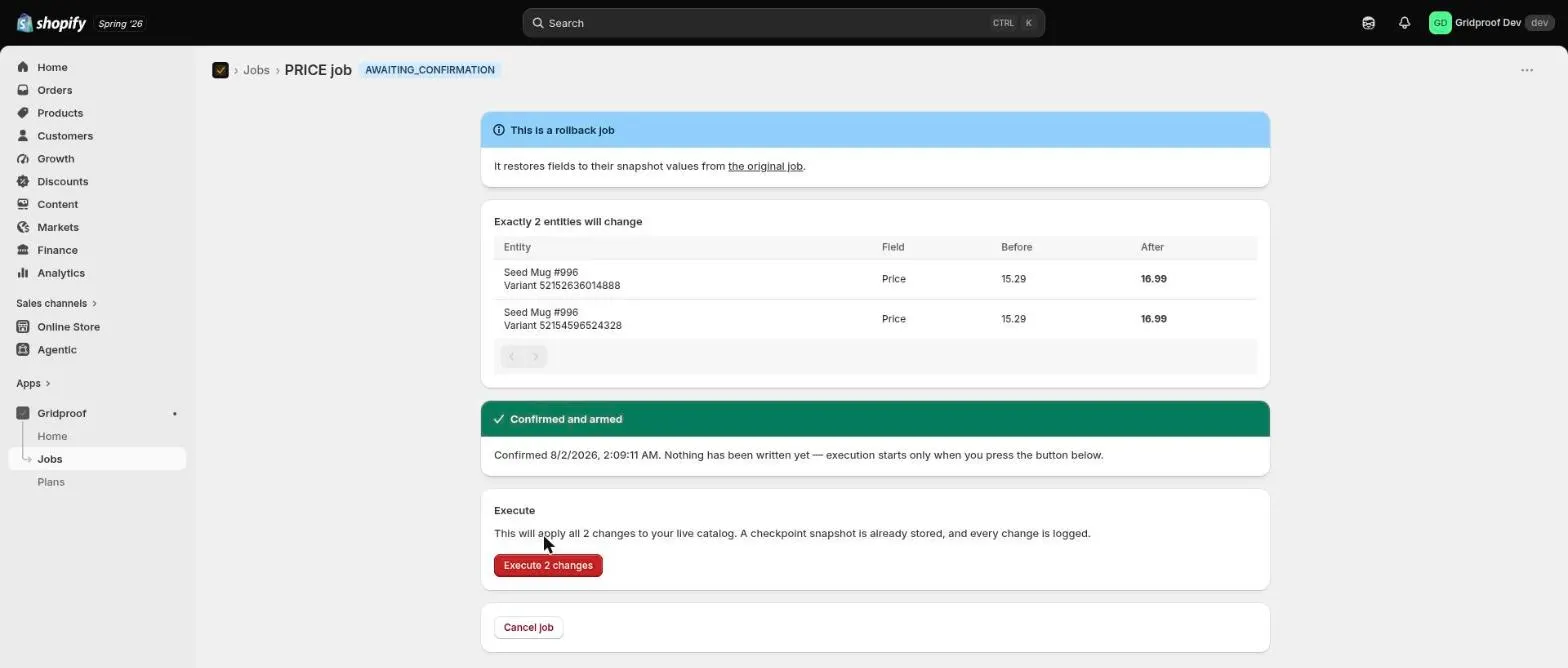
Once the rollback verifies, the original job is marked as rolled back and the two link to each other, so the history reads correctly later.
Why some rows get skipped
Suppose you ran a price change on Monday, a colleague hand-corrected three of those products on Tuesday, and you roll the job back on Wednesday. A rollback that restored every product to its Monday value would silently destroy Tuesday's work.
Gridproof doesn't. Before restoring anything it checks whether each entity is still exactly as the original job left it. Anything that has moved since is skipped and flagged, with the evidence shown on the row, and the rest is restored normally.
The force option
There is a Force checkbox on the rollback card. It restores snapshot values even where the catalog has changed since, overwriting those newer edits.
Use it when the newer edits are themselves the mistake — and essentially never otherwise. The legitimate case is narrow: a second bad job ran on top of the first, and you want the catalog back at the checkpoint regardless of what happened in between. Outside that, a skipped row is Gridproof protecting somebody's deliberate work. Read the skipped rows before you decide; they're listed individually with what's currently there.
How long you have
The rollback window is the snapshot retention period for your plan:
| Plan | Rollback window |
|---|---|
| Free | 7 days |
| Standard | 30 days |
| Premium | 90 days |
Three behaviours that matter more than the numbers:
- Upgrading extends the snapshots you already have, not just future ones. If a window has lapsed and you need it back, upgrading is a real recovery path rather than a purchase for next time.
- Downgrading never shortens a window you were already promised. Existing snapshots keep the longer of what they had and what the new plan grants.
- Rollbacks ignore plan limits entirely. The Free plan caps a job at 100 changes, but a rollback of a 5,000-change job you ran while on a paid plan is not blocked by dropping back to Free. Being able to undo is never something you can lose by not paying.
Two structural limits, both deliberate: a job can be rolled back once, and a rollback cannot itself be rolled back. If you want the change back after undoing it, run it again as a new job — which gives it its own preview, its own confirmation and its own checkpoint.
The audit trail
Separately from job history, every applied field change is recorded on its own: which entity, which field, the value before, the value after, when, and where it came from — a job you ran in the app, a CSV import, or a rollback.
This is the record that answers "why did margin move in March", six weeks after anybody remembers running the job. It is on every plan, free included, because an audit trail you only have on the expensive tier is one you won't have on the day it matters.
The four exports
| Export | Contains | Where |
|---|---|---|
| Results (CSV) | Every row of this job with its before, after, observed value and outcome. | On the job, every plan. |
| This job's audit log (CSV) | The per-field change records this job produced. | On the job, every plan. |
| Snapshot (JSONL) | The checkpoint itself — the exact prior state, as captured. | On the job, while the rollback window is open. |
| Store-wide audit log (CSV) | Every recorded field change across the whole store, in one file. | On the Jobs list. Premium. |
The store-wide roll-up is the only capability in Gridproof gated by plan. The audit log itself isn't gated, and neither is exporting any individual job's slice of it — that stays free forever, on every tier.
Next steps
- Running bulk edits safely — the habits that keep you out of the rollback flow entirely.
- Your first bulk job — the workflow from the beginning.
- Something already went wrong? — triage, including for edits made outside Gridproof.